

Newspaper App
Our intention with the Newspaper App is to provide a simple way for people to read stories on their phone or tablet.
Result from our intention is to help people feel joy, greater sense of connection, appreciation for their vibrant communities with different heritages.
App fundaments
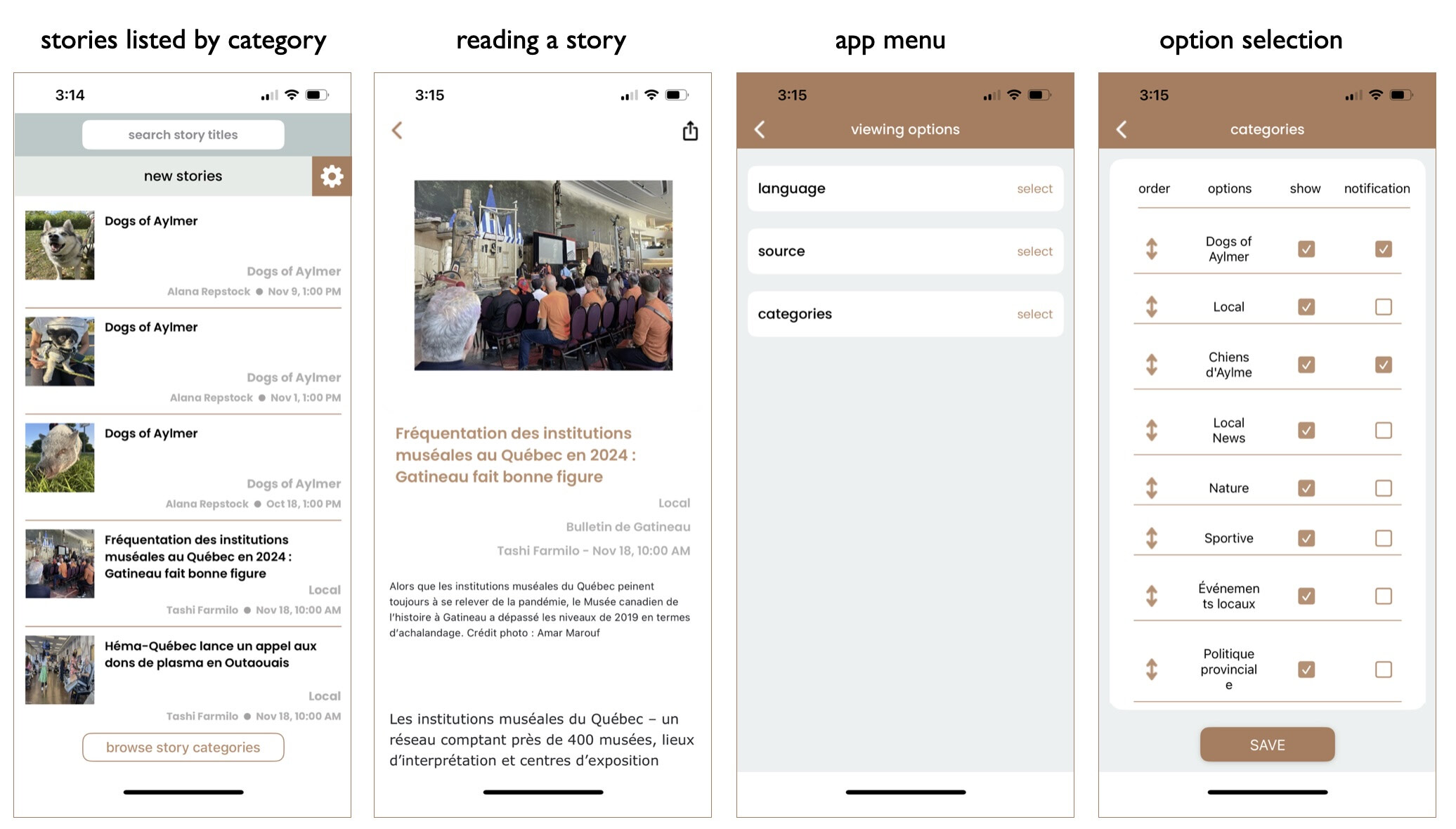
Interacting with the Newspaper app
- The app opens with a search bar at the top, for searching stories titles only
- The search results display only the results with the search words in the story title
- Below the search bar is the story category title, the app opens in new stories category
- The gear icon opens the menu for setting up your preferences for story languages, newspaper sources, story categories, order the categories are displayed in, story notifications for each paper and category
- The preview for each story has an image, title, category, author, dated and time story published
- Clicking on the story preview opens the story, at the top of the screen is a back button and a share story button
- The footer for the app has a browser story category button to help you get to a category without needing to scroll through all the new stories
- Stories are removed from the app after 30 days
- For accessing stories older than 30 days please visit the website for the paper with the story that interests you.
- Any Ads appearing in a story are from the paper the story was published in

Newspaper App menu functions
Language selection, stories are published in French and English you select which languages you want to see stories in
Sample story categories might be; Local News, Council, Buildings and Developments, Arts and Culture, Local Events, Sports, Provincial Politics, Nature. Local Photographs, Kids’ Corner, Letters to the Editor, Opinion Writers, Classified Ads, Community Voices, Education & Schools, Healthy Living
App menu for managing your story preferences
- Languages - select if you would like French and or English stories
- Source – select which of the four papers you would like to see stories from
- Categories – select the stories categories for the stories you would like to see, arrange the order your category stories are display in
- Notifications – you can turn on or off notification for each source and category
- Share button to share stories
- Search function that searches stories titles based on the words you type in the search field
- Browse Categories button to open the category list to view stories in a specific category